





How to create Rate Rules for Dynamic Pricing?
Introduction
Rate Rules are powerful pricing tools that automatically adjust your rental property rates based on specific conditions such as guest count or length of stay. This dynamic pricing functionality helps maximize revenue and increase bookings by implementing sophisticated pricing strategies that respond to different booking scenarios. Rate Rules allow you to offer incentives for longer stays or smaller groups, or to charge appropriately for larger parties that incur additional costs.
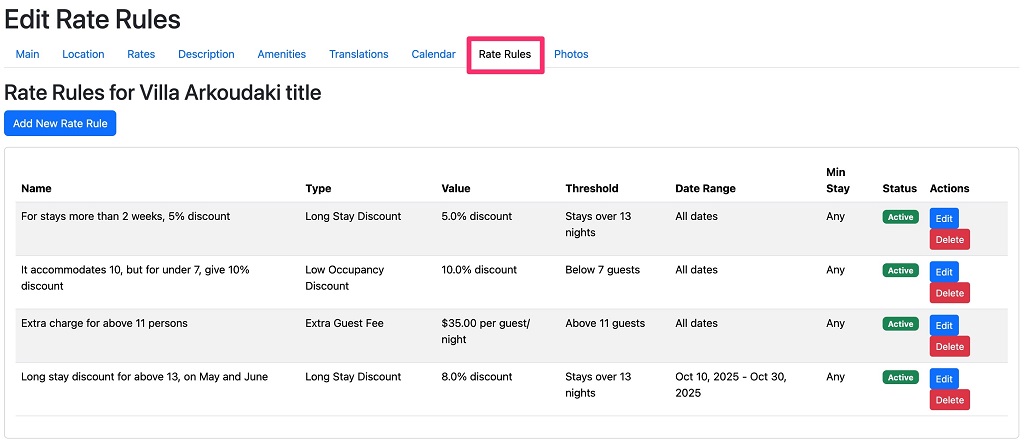
This customizable approach to pricing gives you greater control over your revenue management while providing flexibility to attract different types of guests.
Types of Rate Rules:
-
Extra Guest Fee
The Extra Guest Fee rule adds an additional charge per night for each guest above a specified threshold. This is ideal for properties where hosting additional guests increases costs or causes additional wear and tear.
Example: You have a 8-person villa with a base price of €100/night, but extra guests require additional utilities and cleaning.
- Rule Setup: €20 per extra guest per night above 8 people
- Booking Scenario: A family of 10 books for 7 nights
- Calculation:
- Base price: €100 × 7 nights = €700
- Extra guests: 2 people × €20 × 7 nights = €280
- Final price: €700 + €280 = €980
When to Use:
- When hosting additional guests increases your costs
- When you can accept larger groups but want to offset additional wear and tear
- When you provide extra amenities or services for larger parties
-
Low Occupancy Discount
The Low Occupancy Discount rule offers a percentage discount on the total booking price when the number of guests is below a specified threshold. This helps attract smaller parties to properties that might otherwise seem too large or expensive.
Example: Your 4-bedroom villa can accommodate up to 8 people, but you want to attract couples or small families.
- Rule Setup: 10% discount for bookings with fewer than 5 guests
- Booking Scenario: A couple books for 5 nights at €150/night
- Calculation:
- Base price: €150 × 5 nights = €750
- Discount: €750 × 10% = €75
- Final price: €750 – €75 = €675
When to Use:
- To increase occupancy during off-peak seasons
- To attract couples or small families to larger properties
- When smaller groups use less utilities and require less cleaning
-
Long Stay Discount
The Long Stay Discount rule applies a percentage discount to bookings with a duration longer than a specified number of nights. This encourages extended stays and reduces turnover costs.
Example: You want to encourage longer bookings to reduce turnover and cleaning costs.
- Rule Setup: 10% discount for stays longer than 13 nights
- Booking Scenario: A family books your apartment for 14 nights at €120/night
- Calculation:
- Base price: €120 × 14 nights = €1,680
- Discount: €1,680 × 10% = €168
- Final price: €1,680 – €168 = €1,512
When to Use:
- To encourage longer stays and reduce turnover
- To maximize occupancy during shoulder seasons
- To compete with monthly rental options in your area
-
Special Offers
Create seasonal special offers with automatic start and end dates. Promotions are activated and deactivated automatically, eliminating the need for manual management.
Example: Your base price is €100/night, and you want to offer a 15% seasonal discount for all bookings made in September.
- Rule Setup: 15% Seasonal Discount (September)
- Booking Scenario: A family books 7 nights in September.
- Calculation:
- Base price: €100 × 7 nights = €700
- Seasonal discount: 15% of €700 = €105
- Final price: €700 − €105 = €595
When to Use:
Use special offers to create targeted promotions and increase bookings during specific periods or under specific conditions. They are ideal for seasonal campaigns, low-demand periods, last-minute deals, early bookings, or encouraging longer stays.
Customizing Restrictions on Rate Rules
All rules can be further refined using additional parameters:
Date Range: Apply rules only during specific periods (e.g., high season, off-season, events)
Minimum Stay: Apply rules only to bookings above a minimum number of nights
Advanced Example: Create seasonal pricing strategies:
- High Season (July-August): €25 fee per extra guest above 6 people
- Low Season (May or October): 20% discount for groups smaller than 4 people
- Year-round: 15% discount for smaller groups but for longer than 5 nights stay
Setting Up Rate Rules
To set up rate rules for your rental:
- Go to your rental’s dashboard
- Navigate to the “Rate Rules” section
- Click “Add New Rule”
- Choose the rule type
- Set the parameters (threshold, value)
- Optionally, specify date ranges and minimum stay requirements
- Save your rule
Rules are evaluated in order and can be combined to create sophisticated pricing strategies. When multiple rules of the same type apply, only the first matching rule of each type will be used. You can apply one rule of each type simultaneously (one Extra Guest Fee, one Low Occupancy Discount, and one Long Stay Discount).
Frequently Asked Questions
Q: Can I apply multiple rules to the same booking? A: Yes! Different types of rules can apply simultaneously. For example, a booking could receive both a low occupancy discount and a long stay discount if it meets both criteria. However, only one rule of each type will apply.
Q: Do rate rules affect my base rates? A: No. Rate rules apply adjustments on top of your existing daily rates. Your base calendar rates remain unchanged.
Q: Can guests see the rate rules applied to their booking? A: Guests will see the final price with all rate rules applied. They won’t see the individual rules or calculations, but they will benefit from any applicable discounts.
Q: How do I know if my rate rules are working? A: You can test your rules by creating a mock booking with different guest counts and dates. The system will show you the calculated price with all applicable rules.
Need Help? Contact our support team if you need assistance setting up rate rules or have questions about pricing strategies for your property.
