





Can I add a Booking Request Widget for my website?
Yes you can add a Booking Request Widget to your website, and it’s fast and easy. Lefkada-Rentals.com provides you an embed code or widget script that you just copy and paste into your site’s HTML.
📱 Features
- ✅ Professional booking experience – gives your guests a seamless reservation process
- ✅ Responsive design – works on all devices
- ✅ Static site compatible – works without server-side processing or email servers
- ✅ Form validation – prevents invalid date selections & ensures all required fields are filled
- ✅ Spam protection – blocks automated submissions by spam bots
- ✅ Loading states – visual feedback during submission (soon with: availability & rates)
- ✅ Error handling – graceful error management
- ✅ Online payments (optional) – accept credit card payments without additional installations
- ✅ Owner notifications – automatically sends reminders about upcoming guest arrivals
- ✅ Review generation (optional) – automatically encourages guests to leave reviews after their stay
- ✅✅ Completely free – no extra cost for all properties advertised on Lefkada-Rentals.com
📋 Integration Instructions
To use this widget on your website, simply add the following code:
<!– Include the widget script –> <script src=”https://www.lefkada-rentals.com/widget/lefkada-booking-widget.min.js”></script> <!– Place the widget container –> <div data-lefkada-widget data-rental-id=”123″ data-rental-title=”Your Property Name”></div>
🎛️ Configuration Options
data-rental-id: Required – The ID of your rental propertydata-rental-title: Optional – Display name for the property
🚀 Live Demo
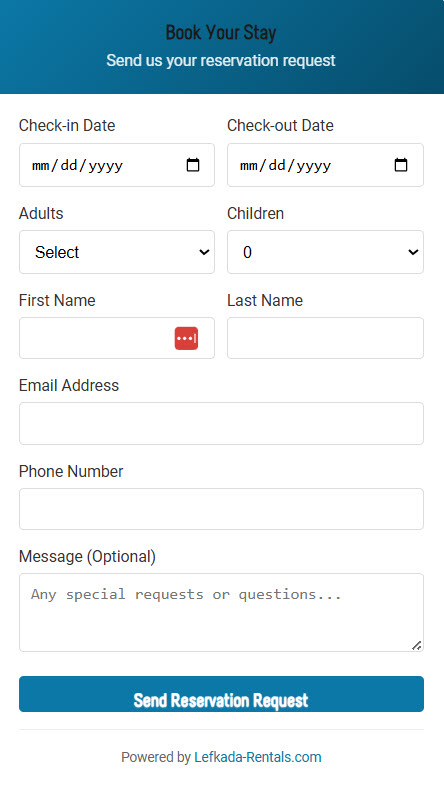
🎨 Customization
The widget can be customized with CSS by targeting the .lefkada-booking-widget class and its child elements.
/* Example: Change widget width and colors */ .lefkada-booking-widget { max-width: 500px; } .lefkada-widget-header { background: linear-gradient(135deg, #your-color1, #your-color2) !important; } .lefkada-submit-btn { background: #your-button-color !important; }
🔗 Support
For support or questions about this widget, please contact us at [email protected]
